



 Genes
Genes Oligo Pools
 NGS
NGS Variant Libraries
 Synthetic Controls
 Antibody Discovery
 IVDR Solutions







Twist Bioscience HQ
681 Gateway Blvd
South San Francisco, CA 94080
After You Order
How Do I Share Orders With My Team?
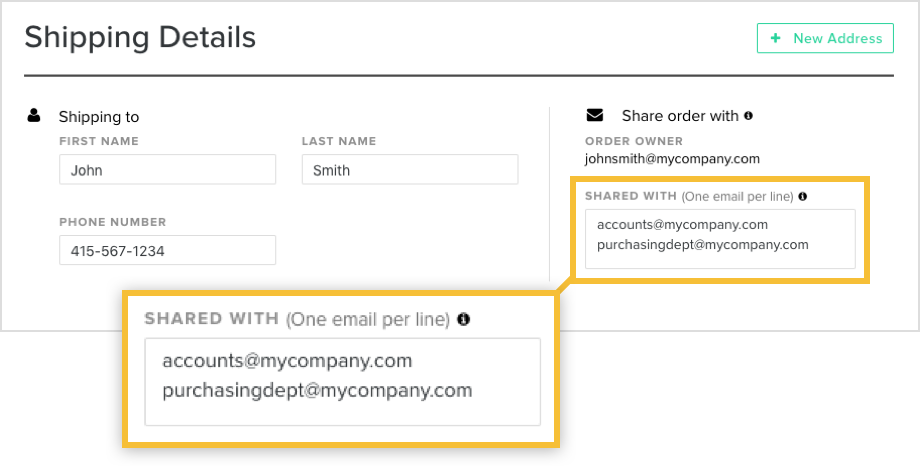
We recommend sharing the order with your purchasing department/accounts payable. Prior to checkout, on the Shipping Details page, there will be a section to enter the email address of the people you want to share your order with.
They will be able to add the payment method if you choose the "No PO" payment method option along with get email notifications related to the order and access the order on their account.
Still have questions? Contact Us
How Do I Add A Payment Method To An Open Order (No PO Order)?
To add a payment method to an open order, follow these steps:
- Log-in to your account
- Go to the the Open Orders section under Orders & Drafts
- Locate the order you want to add a payment method for and click “Add Payment Method”
Still have questions? Contact Us
How Do I Download an Invoice?
Downloading invoices can be done at your convenience by following these simple steps:
1. Log-in to your Twist Bioscience account by clicking here.
2. On the left hand side of the page, click on Account
3. Under Account, select Invoices
4. You will see a list of all of the invoices for your prior orders. Clicking on the Invoice number will allow you to download the invoice
Invoices can also be found by clicking on Past Orders under Orders & Drafts. Select an order and then choose the invoice tab:

Still have questions? Contact Us
How Do I Find the Sequences for a Previous Gene Order?
You can find this information within the shipping collaterals in your account.
- Click on Orders & Drafts from the left side of your eCommerce account
- Click on Past Orders
- Select the order from the available options
Under Shipping and Payment, you will see a button labeled "Download shipment content."

This will download a CSV file with the sequences in your order. If you encounter any issues, please contact customersupport@twistbioscience.com.
Still have questions? Contact Us
How Do I Track An Open Order?
To track an open order, follow these steps:
- Log-in to your account
- Go to the the Open Orders section under Orders & Drafts
- Locate the order
- Click on “View order details”. This will show you the progress of the order.
*Email notifications are also sent once the order moves between the different stages (i.e. when an order is started, when a shipment is on it’s way).
Still have questions? Contact Us
How Do I Share Orders With My Team?
We recommend sharing the order with your purchasing department/accounts payable. Prior to checkout, on the Shipping Details page, there will be a section to enter the email address of the people you want to share your order with.
They will be able to add the payment method if you choose the "No PO" payment method option along with get email notifications related to the order and access the order on their account.
Still have questions? Contact Us
How Do I Add A Payment Method To An Open Order (No PO Order)?
To add a payment method to an open order, follow these steps:
- Log-in to your account
- Go to the the Open Orders section under Orders & Drafts
- Locate the order you want to add a payment method for and click “Add Payment Method”
Still have questions? Contact Us
How Do I Download an Invoice?
Downloading invoices can be done at your convenience by following these simple steps:
1. Log-in to your Twist Bioscience account by clicking here.
2. On the left hand side of the page, click on Account
3. Under Account, select Invoices
4. You will see a list of all of the invoices for your prior orders. Clicking on the Invoice number will allow you to download the invoice
Invoices can also be found by clicking on Past Orders under Orders & Drafts. Select an order and then choose the invoice tab:
Still have questions? Contact Us
How Do I Find the Sequences for a Previous Gene Order?
You can find this information within the shipping collaterals in your account.
- Click on Orders & Drafts from the left side of your eCommerce account
- Click on Past Orders
- Select the order from the available options
Under Shipping and Payment, you will see a button labeled "Download shipment content."
This will download a CSV file with the sequences in your order. If you encounter any issues, please contact customersupport@twistbioscience.com.
Still have questions? Contact Us
How Do I Track An Open Order?
To track an open order, follow these steps:
- Log-in to your account
- Go to the the Open Orders section under Orders & Drafts
- Locate the order
- Click on “View order details”. This will show you the progress of the order.
*Email notifications are also sent once the order moves between the different stages (i.e. when an order is started, when a shipment is on it’s way).
Still have questions? Contact Us