



 Genes
Genes
 Oligo Pools
 NGS
NGS
 Variant Libraries
 Antibodies
 IVDR Solutions






Twist Bioscience HQ
681 Gateway Blvd
South San Francisco, CA 94080
Using Your Twist Account
Getting started
To create an account, follow these steps:
1. Go to our website
2. Click on “Create an Account”
3. Enter the requested information
4. Click “Create Account”
We will send you an account confirmation email. If you do not receive it, please check your spam folder. Once you have confirmed your email, you will be able to log in and begin ordering. If you encounter any issues, please email customersupport@twistbioscience.com or contact us via chat.
Customers are currently able to refer their colleagues to Twist and both receive a $25 Amazon gift card once an order has been placed. Here are steps you can take to refer your friends:
- While logged in to your account, click on “Invite Friends”
- Enter in your friend’s email and country
- Click on "Send Invite"
- Once your friend signs up and we confirm the order has been placed, we will email you the gift card.
Placing an order
The easiest and fastest way to receive a quote is to create an account on our eCommerce site. As soon as your account is set up, you can create a new draft project for Synthetic Biology (Gene Fragments/Clonal Genes/Oligo Pools) or Next Generation Sequencing products (DNA Library Preparation and Enrichment Panels).
To resume editing a draft, follow these steps:
- Log-in to your account
- On the left hand side of the screen, there will be a section called Orders & Drafts. Click on Drafts.
- Click on the name of the Draft you want to edit.
- You will now be able to proceed with making changes to the Draft.
*If the draft is already in the checkout phase, you will be able to go back and edit by clicking on the “Edit Order” button.
Payment methods can be added when you are checking out for your order. If you need to add a payment prior to placing an order, you can follow these steps:
1. Log-in to your account
2. On the left hand side of the page, go to Account
3 Click on Payment Method
4. There will be the option to add a credit card or add a PO.
a. Credit Card: customer is paying via a credit card
b. PO: customer is paying via a PO and will be invoiced once their order ships
**Please note uploading the PO does not place the order (it only stores the PO in your account). You will still need to checkout to place the order. Once you checkout, a member of our Support team will review the order and move it into production.
**For questions around BPOs, please contact our Customer Support team at customersupport@twistbioscience.com.
Shipping addresses can be added during the checkout process. However, if you need to update the address for your account without placing an order, you can follow these steps:
1. Log-in to your account
2. On the left hand side of the page, click on Shipping Addresses (under Account)
3. There will be the option to add a new address by clicking on the “New address” button.
4. You will be prompted to enter your shipping information.
The Twist codon optimization tool randomly assigns synonymous codons based on the selected organism's codon preferences. Here is a list of considerations during optimization:
- We assign more common codons more frequently than less common ones
- We avoid using rare codons (those with a codon frequency of <8%)
- We ensure sequences do not have strong hairpins (∆G <-8) in the first 48 base pairs of resulting sequences
- We check both strands to ensure they don't contain the enzyme cut sites you asked us to avoid creating
- We avoid introduction of promoter sequences internal to expression sequence by avoiding the creation of strong sigma70 binding sites
- We avoid sequences that create strong ribosome binding sites (GGAGG and TAAGGAG)
- We avoid sequences that create terminator sequences (TTTTT or AAAAA) Since the most preferred codon is not always assigned, you should not expect to see the same output after each optimization attempt (no 1:1 codon to amino acid assignment).
- You should expect to see a different optimized sequence if you optimize the same sequence multiple times.
Please note that optimal expression cannot be guaranteed for any sequence that goes through Twist optimization as there are many factors that go into quality expression, some of which are not well understood.
Additional factors, such as mRNA stability, protein maturation, translational speed, chaperone expression, promoter design, expression vector etc. also influence expression.
After you order
To add a payment method to an open order, follow these steps:
- Log-in to your account
- Go to the the Open Orders section under Orders & Drafts
- Locate the order you want to add a payment method for and click “Add Payment Method”
Downloading invoices can be done at your convenience by following these simple steps:
1. Log-in to your Twist Bioscience account by clicking here.
2. On the left hand side of the page, click on Account
3. Under Account, select Invoices
4. You will see a list of all of the invoices for your prior orders. Clicking on the Invoice number will allow you to download the invoice
Invoices can also be found by clicking on Past Orders under Orders & Drafts. Select an order and then choose the invoice tab:

You can find this information within the shipping collaterals in your account.
- Click on Orders & Drafts from the left side of your eCommerce account
- Click on Past Orders
- Select the order from the available options
Under Shipping and Payment, you will see a button labeled "Download shipment content."

This will download a CSV file with the sequences in your order. If you encounter any issues, please contact customersupport@twistbioscience.com.
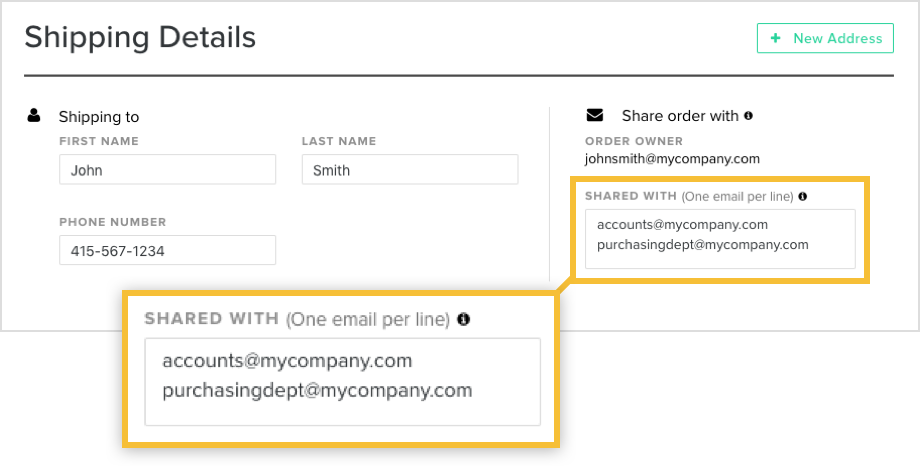
We recommend sharing the order with your purchasing department/accounts payable. Prior to checkout, on the Shipping Details page, there will be a section to enter the email address of the people you want to share your order with.
They will be able to add the payment method if you choose the "No PO" payment method option along with get email notifications related to the order and access the order on their account.
To track an open order, follow these steps:
- Log-in to your account
- Go to the the Open Orders section under Orders & Drafts
- Locate the order
- Click on “View order details”. This will show you the progress of the order.
*Email notifications are also sent once the order moves between the different stages (i.e. when an order is started, when a shipment is on it’s way).
Don’t have an account? Sign up now
Still have questions? Contact us
Learn more about Twist Account