



 Genes
Genes
 Oligo Pools
 NGS
NGS
 Variant Libraries
 Antibodies
 IVDR Solutions










Twist Bioscience HQ
681 Gateway Blvd
South San Francisco, CA 94080
Custom Vector Onboarding
General
The turnaround time for onboarding is 10-15 business days from the start of onboarding (not from when we receive the vector). We will assign a start date once we receive both the vector aliquot and the completed vector onboarding form.
Vector DNA should be resuspended in nuclease-free Tris-EDTA (TE) buffer, pH 8.0 or 10 mM Tris-HCl, pH 8.0. We do not recommend resuspension in water.
If unanticipated issues are discovered during the onboarding process, Customer Support will notify you immediately and provide a revised completion date for onboarding.
Twist Vectors (sequences and maps) can be found on your Account Page under "My Vectors:"
Please contact customersupport@twistbioscience.com.
Design
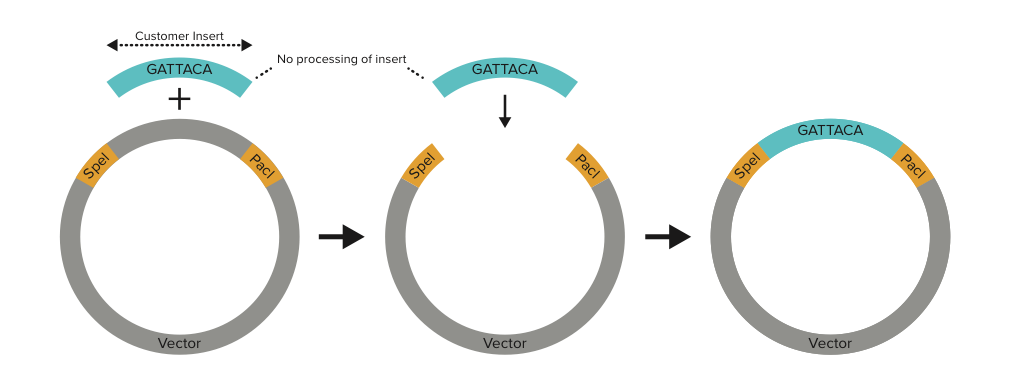
We use a proprietary homology-based cloning method to assemble our clonal genes, so restriction sites are not critical to cloning and you do not need to consider Twist's cloning design when designing your insert. However, if your insertion site is between two restriction sites, include these as part of the vector backbone, to ensure features are in frame.
There are two options for using restriction enzyme cloning.
Option 1 - Include Restriction Sites on the insert
Include the whole restriction enzyme site on either end of the insert sequence. The restriction enzyme sites will be part of the inserts in silico.
When you order genes, you must include restriction enzyme sites on the inserts. In this custom vector onboarding scenario, if you exclude restriction enzyme sites on the genes in your order, the restriction enzyme sites will be completely absent from your final product.
Option 2 - Include Restriction Sites on the vector
Do not include restriction enzyme sites on the insert sequence. Include each whole restriction enzyme site on the Vector + Insert box in Custom Vector onboarding form. The restriction enzyme sites will be part of the vector in silico.
When you order genes, do not include restriction enzyme sites on the inserts. In this custom vector onboarding scenario, if you include restriction enzyme sites on the genes in your order, the restriction enzyme sites will be duplicated in your final product.
After inputting your insert into the designer and selecting your custom vector, download the final construct sequence from the Twist website.
Details below:
While ordering:
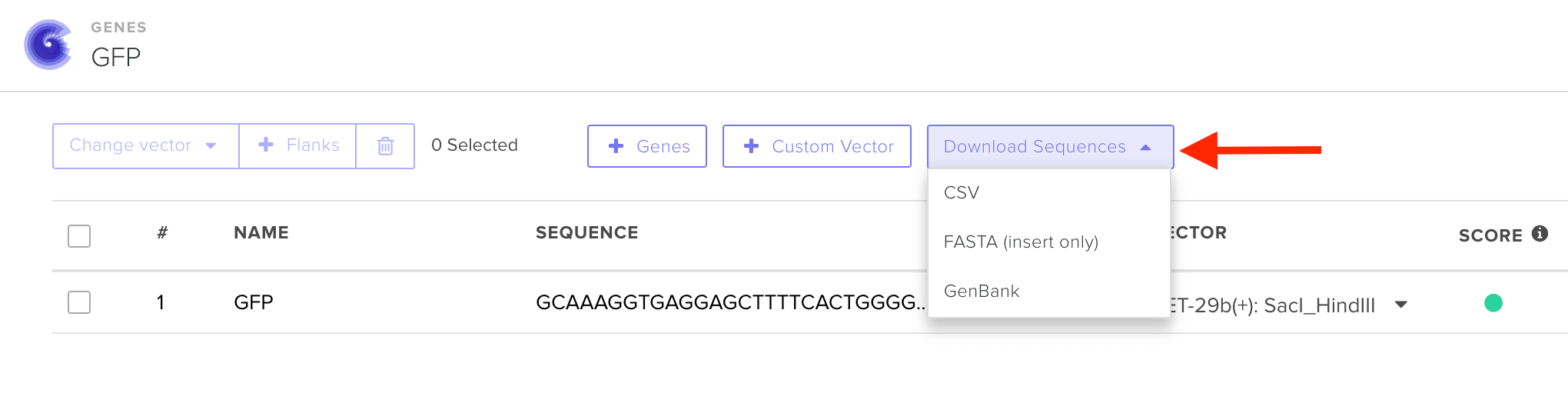
“Download sequences” button on drafts page will give you insert, vector, and final construct sequence details for your whole order.
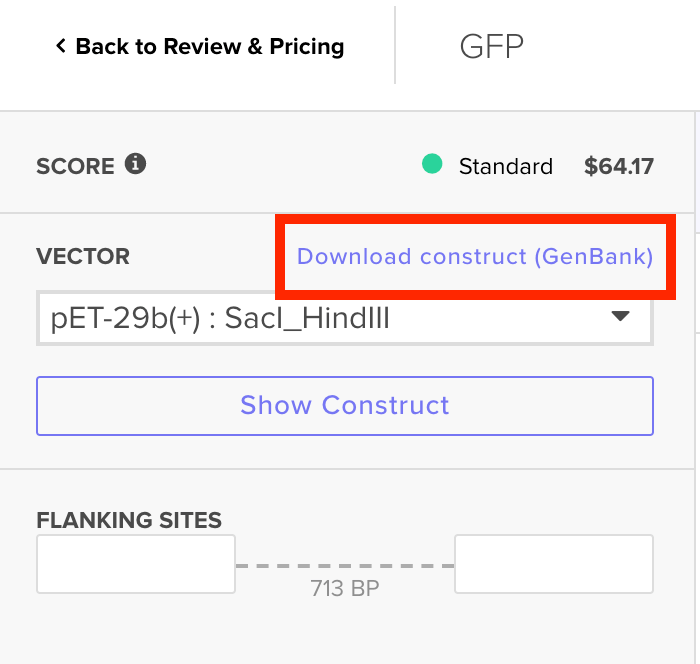
“Download construct (GenBank)” button on gene editor page will give you an annotated GenBank file with the final construct sequence.
After order is placed:
Go to “Orders & Drafts” from the home page, and then click “open orders." Find the order of interest and the order information will be displayed. You can click the “original submitted sequences” button which will download a file with your final sequences.
After designing your insertion site on the app, click on the “Preview and Add” link next to the number box, to review the insertion site, either in map form or sequence form. Once you've reviewed the insertion site and determined that the insertion site is configured correctly, select “Approve insertion point”. The insertion site details will appear as a row under the “INSERTION SITES” on the left-side of the panel, and you can continue editing your draft with new insertion sites. However, please note that while multiple insertion sites can be added to each Custom Vector. Only one insert can be cloned into a vector at a time.
Note: If you wish to add an insertion site to a vector that has already been onboarded with us, you do not need to ship us a new aliquot of vector material, but you will need to contact customer support at customersupport@twistbioscience.com, as it will require onboarding through an alternate submission form.
One vector with one insertion site is considered one on-boarding event. Multiple insertion sites will result in multiple on-boarding events.
There is a one-time onboarding fee of $500 for the first insertion site and $250 for each additional insertion site within in the same custom vector.
Preparing Your Order
We do not use restriction enzyme based cloning. Please do not include any extra nucleotides in your inserts in anticipation of Restriction Enzyme digestion followed by DNA ligation.
When you place an order for a clonal gene, we synthesize exactly the insert sequence you send us. If you do include flanking Restriction Enzyme sites, we will synthesize those, too; extra base pairs are not excised. The insert sequences are not processed in any way once they are received.
If you are placing a clonal gene order using a Twist or Custom Vector, we highly recommend that you double check the sequence of the final construct using the Download sequences button in the designer:
Please note that once a gene order has been placed, we cannot alter the sequence in any way - if you discover an error in your construct, please contact customersupport@twistbioscience.com for assistance.
Please provide us with 10 ug vector DNA at a concentration of 100 ng/ul in at least 100 ul. Insufficient quantity of vector DNA will cause a delay to the onboarding process.
No, you must include the complete sequence of the vector sent to Twist. We use this information for sequence QC and to confirm the cloning strategy. We will sequence your vector and compare it to the sequence you sent us. Errors or mismatches between the two sequence results may delay vector onboarding.
You will be required to upload the complete vector sequence in GenBank format with the full sequence of the plasmid that will be shipped to Twist. Twist will sequence the incoming vector to ensure the sequences match. Any discrepancies will delay the on-boarding process.
Ensure your vector meets the following requirements:
- Vector Volume ≥ 100 uL (Plasmid material cannot be submitted on filter paper)
- Vector Concentration ≥ 100 ng/uL
- Vector Mass 10 ug
- Must have bacterial origin of replication (not low copy)
- Must be clonal population
- Must be circular
- Must have antibiotic resistance marker
- Must not contain homopolymers/repetitive sequence >9bp within 40bp of the insertion site
- Repeats: Must contain at least 40bp of unique sequence with no direct or inverted repeats >19bp upstream and downstream of the insertion site
- Must not contain ccdB in final gene product
- Must be able to linearize by Restriction Enzyme site within 50bp of insertion site
- Must be BSL-1 compliant
Antibiotic Resistance:
Plasmid must contain one of the below antibiotic resistance markers for E.coli. Standard concentrations are below:
Antibiotic | Standard concentration available in Production (ug/mL) |
Kan | 50 |
AMP | 100 |
CHLOR | 25 |
APRA | 50 |
SPEC | 100 |
TET | 10 |
ZEO | 50 |
BLAST | 100 |
Cell Lines (E. coli)
- Cell Line available in Production
- Cloning strain similar to DH10Beta
- Stbl3-like strain (can be grown at 37℃)
Copy number
Only constitutive origins of replication are allowed.
Twist Definition | Accepted | Example |
High | Yes | ColE1/pMB1/pBR322/pUC |
Medium | Yes, reduced miniprep yield | p15A |
Low | No | pSC101 |
Growth Conditions
- Standard Temperature: 37℃/30℃
- Standard Time: Overnight/24hrs
- Plated colonies must reach an automation friendly size after 16hrs/24hrs of growth on LB-Lennox.
QC Results
We will notify the customer if we find an insertion/deletion over 100bp in the vector backbone. If there is an insertion/deletion/mutation 200bp upstream or downstream of the insertion site, we will inform the customer.
Twist will sequence the incoming vector, however, only the region surrounding the insertion site (within 200bp on either side of the insertion site) will be analyzed for discrepancies between what is stated as the Vector Reference Sequence in the received Custom Vector On-boarding form and the QC data.
We will report if the sequence does not match or if large deletions or insertions (>100bp) are observed compared to the Vector Reference Sequence provided by the customer. Please note that we currently do not report on SNPs outside of the 200bp on either side of the insertion site.
If any deviations from the Vector Reference Sequence is found, this could delay the completion time for onboarding.
Still have questions? Contact us
Learn more about Custom Vector Onboarding